
Invoicing with Xero
Traffic management invoicing, straight into Xero.
The job is booked, worked and signed off in TTM Control, so the details for the invoice are already there. Finished jobs line up ready to bill, and a draft invoice goes into your own Xero with a tap.
Ready to Invoice
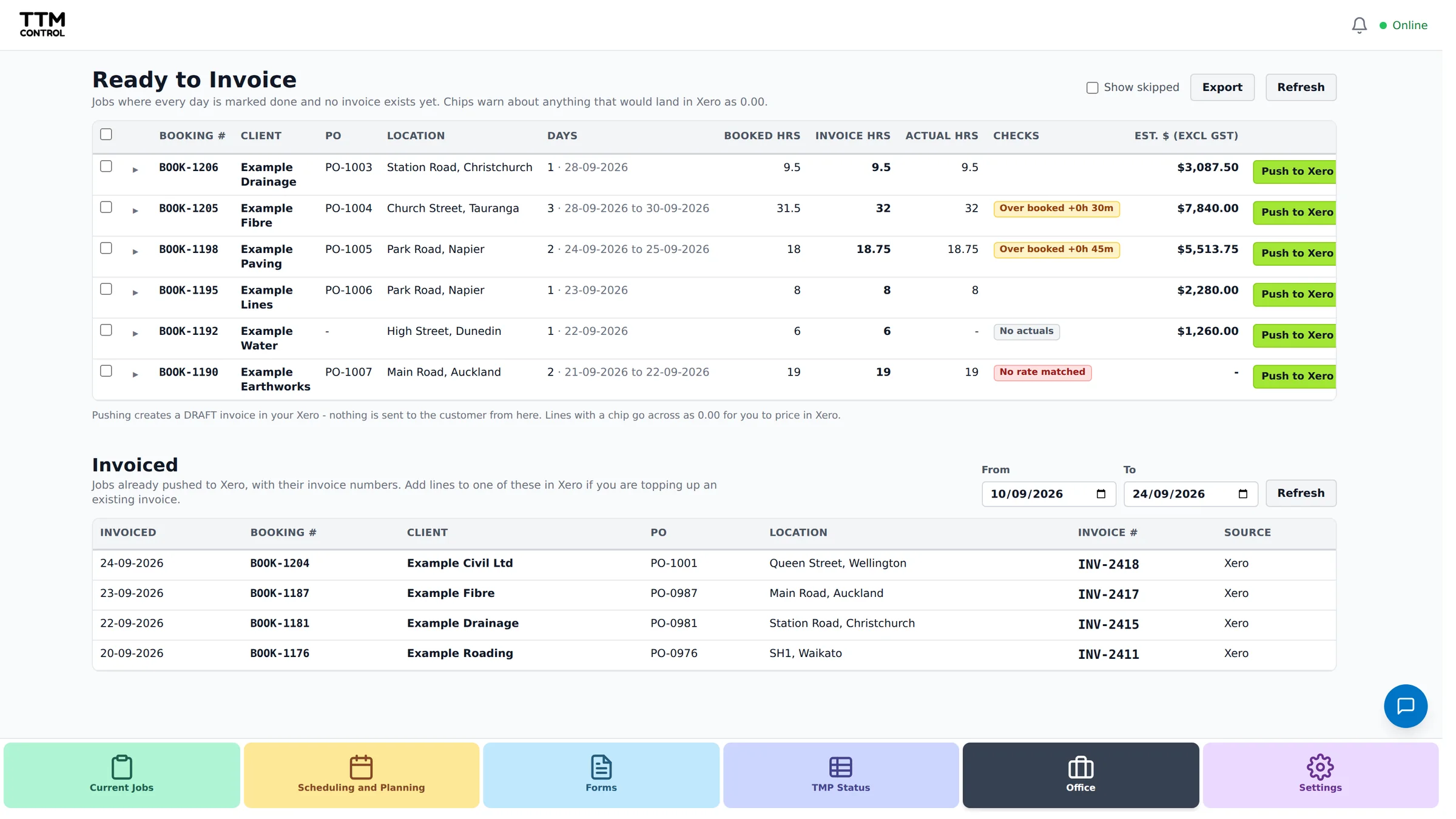
Every finished job on one list
When the site paperwork is complete the job joins the Ready to Invoice list. Each one shows the hours from site beside the hours you booked, so you can see an overrun before the client does. Mark a job invoiced by hand, or push it to Xero.
Xero
A draft invoice, not a finished one
Connect your company's Xero once. Pushing a job creates a draft invoice to the client, with the PO number, booking number and job numbers in the reference and a line for each day worked, plus gear. Prices come from the rates you set up in TTM Control, and anything without a matching rate is left for you to fill in.
The invoice lands as a draft, so you check it and approve it in Xero as you do now. What you see on the Ready to Invoice list is what gets sent.
Hours
Timesheets and hours for payroll
Staff fill in their own timesheet on their phone, pre-filled from the booked day's times, and an STMS or manager confirms the hours. The staff hours grid pulls approved hours together week by week and exports to Excel for payroll.
Other packages
Not on Xero?
Xero is the accounting package TTM Control connects to today. Without it you can still use the Ready to Invoice list and mark jobs invoiced as you bill them. Start with booking and scheduling to see where the invoice details come from.
TTM Control is priced per company, not per user. Enquire for pricing at [email protected].
Start your free trial.
Leave your details and we will get your company set up and help you through your first week.
What happens next
- We set up your company and email you a login.
- Add your staff, vehicles and clients. We send a step by step guide.
- Book your first job and send it to the crew.
Enquire for pricing, or talk to us first: [email protected]